---
last_modified: 2026-05-20
title: "Dependency management"
description: "A practical guide to managing dependencies in Deno: adding and removing packages, pinning versions, overriding and vendoring dependencies, lockfiles and integrity checking, supply chain management, publishing, and private registries."
oldUrl:
- /runtime/manual/basics/modules/integrity_checking/
- /runtime/manual/basics/modules/publishing_modules/
- /runtime/manual/basics/modules/reloading_modules/
- /runtime/manual/basics/vendoring/
- /runtime/manual/advanced/http_imports/
- /runtime/manual/advanced/publishing/dnt/
- /runtime/manual/advanced/publishing/
- /runtime/manual/examples/manage_dependencies
- /runtime/manual/node/cdns.md
- /runtime/manual/linking_to_external_code/reloading_modules
- /runtime/fundamentals/esm.sh
- /runtime/manual/advanced/private_repositories/
- /runtime/reference/private_repositories/
---
This guide covers the day-to-day tasks of working with dependencies in Deno:
adding and removing packages, choosing versions, overriding and vendoring
dependencies, lockfiles, supply chain hygiene, publishing, and private
registries. For an introduction to how Deno's module system and import maps
work, see [Modules](/runtime/fundamentals/modules/).
## Adding dependencies with `deno add`
The installation process is made easy with the `deno add` subcommand. It will
automatically add the latest version of the package you requested to the
`imports` section in `deno.json`.
```sh
# Add the latest version of the module to deno.json
$ deno add jsr:@luca/cases
Add @luca/cases - jsr:@luca/cases@1.0.0
```
```json title="deno.json"
{
"imports": {
"@luca/cases": "jsr:@luca/cases@^1.0.0"
}
}
```
You can also specify an exact version:
```sh
# Passing an exact version
$ deno add jsr:@luca/cases@1.0.0
Add @luca/cases - jsr:@luca/cases@1.0.0
```
:::info Deno 2.8
Unprefixed package names passed to `deno add` / `deno install` are treated as
npm packages by default. `deno add express` is now equivalent to
`deno add npm:express`. JSR packages still need the `jsr:` prefix to stay
unambiguous.
:::
Read more in [`deno add` reference](/runtime/reference/cli/add/).
You can also remove dependencies using `deno remove`:
```sh
$ deno remove @luca/cases
Remove @luca/cases
```
```json title="deno.json"
{
"imports": {}
}
```
Read more in [`deno remove` reference](/runtime/reference/cli/remove/).
## Package Versions
It is possible to specify a version range for the package you are importing.
This is done using the `@` symbol followed by a version range specifier, and
follows the [semver](https://semver.org/) versioning scheme. If you need to
share a single version range across multiple workspace members, see
[`catalog:` for centralized dependency versions](/runtime/fundamentals/workspaces/#centralized-dependency-versions-with-catalog).
For example:
```bash
@scopename/mypackage # highest version
@scopename/mypackage@16.1.0 # exact version
@scopename/mypackage@16 # highest 16.x version >= 16.0.0
@scopename/mypackage@^16.1.0 # highest 16.x version >= 16.1.0
@scopename/mypackage@~16.1.0 # highest 16.1.x version >= 16.1.0
```
Here is an overview of all the ways you can specify a version or a range:
| Symbol | Description | Example |
| --------- | ------------------------------------------------------------------------------------------------------------------------------------------------------------------- | --------- |
| `1.2.3` | An exact version. Only this specific version will be used. | `1.2.3` |
| `^1.2.3` | Compatible with version 1.2.3. Allows updates that do not change the leftmost non-zero digit.
For example, `1.2.4` and `1.3.0` are allowed, but `2.0.0` is not. | `^1.2.3` |
| `~1.2.3` | Approximately equivalent to version 1.2.3. Allows updates to the patch version.
For example, `1.2.4` is allowed, but `1.3.0` is not. | `~1.2.3` |
| `>=1.2.3` | Greater than or equal to version 1.2.3. Any version `1.2.3` or higher is allowed. | `>=1.2.3` |
| `<=1.2.3` | Less than or equal to version 1.2.3. Any version `1.2.3` or lower is allowed. | `<=1.2.3` |
| `>1.2.3` | Greater than version 1.2.3. Only versions higher than `1.2.3` are allowed. | `>1.2.3` |
| `<1.2.3` | Less than version 1.2.3. Only versions lower than `1.2.3` are allowed. | `<1.2.3` |
| `1.2.x` | Any patch version within the minor version 1.2. For example, `1.2.0`, `1.2.1`, etc. | `1.2.x` |
| `1.x` | Any minor and patch version within the major version 1. For example, `1.0.0`, `1.1.0`, `1.2.0`, etc. | `1.x` |
| `*` | Any version is allowed. | `*` |
## HTTPS imports
Deno also supports import statements that reference HTTP/HTTPS URLs, either
directly:
```js
import { Application } from "https://deno.land/x/oak/mod.ts";
```
or part of your `deno.json` import map:
```json
{
"imports": {
"oak": "https://deno.land/x/oak/mod.ts"
}
}
```
Supporting HTTPS imports enables us to support the following JavaScript CDNs, as
they provide URL access to JavaScript modules:
- [deno.land/x](https://deno.land/x)
- [esm.sh](https://esm.sh)
- [unpkg.com](https://unpkg.com)
HTTPS imports are useful if you have a small, often single file, Deno project
that doesn't require any other configuration. With HTTPS imports, you can avoid
having a `deno.json` file at all. It is **not** advised to use this style of
import in larger applications however, as you may end up with version conflicts
(where different files use different version specifiers). HTTP imports are not
supported by `deno add`/`deno install` commands.
:::info
Use HTTPS imports with caution, and only **from trusted sources**. If the server
is compromised, it could serve malicious code to your application. They can also
cause versioning issues if you import different versions in different files.
HTTPS imports remain supported, **but we recommend using a package registry for
the best experience.**
:::
## Overriding dependencies
Deno provides mechanisms to override dependencies, enabling developers to use
custom or local versions of libraries during development or testing.
Note: If you need to cache and modify dependencies locally for use across
builds, consider [vendoring remote modules](#vendoring-remote-modules).
### Overriding local packages
For developers familiar with `npm link` in Node.js, Deno provides a similar
feature for local JSR and npm packages through the `links` field in `deno.json`.
This allows you to override dependencies with local versions during development
without needing to publish them.
Example:
```json title="deno.json"
{
"links": [
"../some-package-or-workspace"
]
}
```
Key points:
- The `links` field accepts paths to directories containing packages or
workspaces. If you reference a single package within a workspace, the entire
workspace will be included.
- Both JSR and npm packages are supported.
- This feature is only respected in the workspace root. Using `links` elsewhere
will trigger warnings.
Limitations:
- Git-based dependency overrides are unavailable.
- The `links` field requires proper configuration in the workspace root.
### Overriding NPM packages
Deno supports linking npm packages with local versions, similar to how JSR
packages can be linked. This allows you to use a local copy of an npm package
during development without publishing it.
To use a local npm package, configure the `links` field in your `deno.json`:
```json
{
"links": [
"../path/to/local_npm_package"
]
}
```
This feature requires a `node_modules` directory and has different behaviors
depending on your `nodeModulesDir` setting:
- With `"nodeModulesDir": "auto"`: The directory is recreated on each run, which
slightly increases startup time but ensures the latest version is always used.
- With `"nodeModulesDir": "manual"` (default when using package.json): You must
run `deno install` after updating the package to get the changes into the
workspace's `node_modules` directory.
Limitations:
- Specifying a local copy of an npm package or changing its dependencies will
purge npm packages from the lockfile, which may cause npm resolution to work
differently.
- The npm package name must exist in the registry, even if you're using a local
copy.
### Overriding HTTPS imports
Deno also allows overriding HTTPS imports through the `scopes` field in
`deno.json`. This feature is particularly useful when substituting a remote
dependency with a local patched version for debugging or temporary fixes.
Example:
```json title="deno.json"
{
"imports": {
"example/": "https://deno.land/x/example/"
},
"scopes": {
"https://deno.land/x/example/": {
"https://deno.land/x/my-library@1.0.0/mod.ts": "./patched/mod.ts"
}
}
}
```
Key points:
- The `scopes` field in the import map allows you to redirect specific imports
to alternative paths.
- This is commonly used to override remote dependencies with local files for
testing or development purposes.
- Scopes apply only to the root of your project. Nested scopes within
dependencies are ignored.
## Vendoring remote modules
If your project has external dependencies, you may want to store them locally to
avoid downloading them from the internet every time you build your project. This
is especially useful when building your project on a CI server or in a Docker
container, or patching or otherwise modifying the remote dependencies.
Deno offers this functionality through a setting in your `deno.json` file:
```json
{
"vendor": true
}
```
Add the above snippet to your `deno.json` file and Deno will cache all
dependencies locally in a `vendor` directory when the project is run, or you can
optionally run the `deno install --entrypoint` command to cache the dependencies
immediately:
```bash
deno install --entrypoint main.ts
```
You can then run the application as usual with `deno run`:
```bash
deno run main.ts
```
After vendoring, you can run `main.ts` without internet access by using the
`--cached-only` flag, which forces Deno to use only locally available modules.
For more advanced overrides, such as substituting dependencies during
development, see [Overriding dependencies](#overriding-dependencies).
## Publishing modules
Any Deno program that defines an export can be published as a module. This
allows other developers to import and use your code in their own projects.
Modules can be published to:
- [JSR](https://jsr.io) - recommended, supports TypeScript natively and
auto-generates documentation for you
- [npm](https://www.npmjs.com/) - use
[`deno pack`](/runtime/reference/cli/pack/) (Deno 2.8+) to build an
npm-compatible tarball from a Deno project, or
[dnt](https://github.com/denoland/dnt) for a more configurable build pipeline
- [deno.land/x](https://deno.com/add_module) - for HTTPS imports, use JSR
instead if possible
## Reloading modules
By default, Deno uses a global cache directory (`DENO_DIR`) for downloaded
dependencies. This cache is shared across all projects.
You can force deno to refetch and recompile modules into the cache using the
`--reload` flag.
```bash
# Reload everything
deno run --reload my_module.ts
# Reload a specific module
deno run --reload=jsr:@std/fs my_module.ts
```
## Development only dependencies
Sometimes dependencies are only needed during development, for example
dependencies of test files or build tools. In Deno, the runtime does not require
you to distinguish between development and production dependencies, as the
[runtime will only load and install dependencies that are actually used in the
code that is being executed](#why-does-deno-not-have-a-devimports-field).
However, it can be useful to mark dev dependencies to aid people who are reading
your package. When using `deno.json`, the convention is to add a `// dev`
comment after any "dev only" dependency:
```json title="deno.json"
{
"imports": {
"@std/fs": "jsr:@std/fs@1",
"@std/testing": "jsr:@std/testing@1" // dev
}
}
```
When using a `package.json` file, dev dependencies can be added to the separate
`devDependencies` field:
```json title="package.json"
{
"dependencies": {
"pg": "npm:pg@^8.0.0"
},
"devDependencies": {
"prettier": "^3"
}
}
```
### JSR packages in package.json
You can depend on JSR packages directly from `package.json` using the `jsr:`
scheme, without needing a separate `deno.json`:
```json title="package.json"
{
"dependencies": {
"@std/path": "jsr:^1.0.9"
}
}
```
This works with `deno install` and brings JSR packages to any project that uses
`package.json` for dependency management.
### Dependency overrides
The `overrides` field in `package.json` lets you control transitive dependency
versions throughout your dependency tree. This is useful for applying security
patches, fixing version compatibility issues, or replacing packages:
```json title="package.json"
{
"dependencies": {
"express": "^4.18.0"
},
"overrides": {
"cookie": "0.7.0",
"express": {
"qs": "6.13.0"
}
}
}
```
In this example, `cookie` is pinned globally to `0.7.0`, while `qs` is
overridden only when required by `express`.
### Why does Deno not have a `devImports` field?
To understand why Deno does not separate out dev dependencies in the package
manifest it is important to understand what problem dev dependencies are trying
to solve.
When deploying an application you frequently want to install only the
dependencies that are actually used in the code that is being executed. This
helps speed up startup time and reduce the size of the deployed application.
Historically, this has been done by separating out dev dependencies into a
`devDependencies` field in the `package.json`. When deploying an application,
the `devDependencies` are not installed, and only the dependencies.
This approach has shown to be problematic in practice. It is easy to forget to
move a dependency from `dependencies` to `devDependencies` when a dependency
moves from being a runtime to a dev dependency. Additionally, some packages that
are semantically "development time" dependencies, like (`@types/*`), are often
defined in `dependencies` in `package.json` files, which means they are
installed for production even though they are not needed.
Deno offers two approaches for installing production-only dependencies:
- **`deno install --prod`** — skips `devDependencies` from `package.json`. You
can also pass `--skip-types` to additionally exclude `@types/*` packages.
- **`deno install --entrypoint`** — installs only the dependencies that are
actually (transitively) imported by the specified entrypoint file. When
combined with `--prod`, type-only dependencies are also excluded from the
module graph.
See the [`deno install` reference](/runtime/reference/cli/install/) for more
details.
## Using only cached modules
To force Deno to only use modules that have previously been cached, use the
`--cached-only` flag:
```shell
deno run --cached-only mod.ts
```
This will fail if there are any dependencies in the dependency tree for mod.ts
which are not yet cached.
## Integrity Checking and Lock Files
Imagine your module relies on a remote module located at
. When you compile your module for the first time, `a.ts`
is fetched, compiled, and cached. This cached version will be used until you
either run your module on a different machine (such as in a production
environment) or manually reload the cache (using a command like
`deno install --reload`).
But what if the content at `https://some.url/a.ts` changes? This could result in
your production module running with different dependency code than your local
module. To detect this, Deno uses integrity checking and lock files.
Deno uses a `deno.lock` file to check external module integrity. To opt into a
lock file, either:
1. Create a `deno.json` file in the current or an ancestor directory, which will
automatically create an additive lockfile at `deno.lock`.
Note that this can be disabled by specifying the following in your deno.json:
```json title="deno.json"
{
"lock": false
}
```
2. Use the `--lock` flag to enable and specify lock file checking.
### Frozen lockfile
By default, Deno uses an additive lockfile, where new dependencies are added to
the lockfile instead of erroring.
This might not be desired in certain scenarios (ex. CI pipelines or production
environments) where you'd rather have Deno error when it encounters a dependency
it's never seen before. To enable this, you can specify the `--frozen` flag or
set the following in a deno.json file:
```json title="deno.json"
{
"lock": {
"frozen": true
}
}
```
When running a deno command with a frozen lockfile, any attempts to update the
lockfile with new contents will cause the command to exit with an error showing
the modifications that would have been made.
If you wish to update the lockfile, specify `--frozen=false` on the command line
to temporarily disable the frozen lockfile.
### Changing lockfile path
The lockfile path can be configured by specifying `--lock=deps.lock` or the
following in a Deno configuration file:
```json title="deno.json"
{
"lock": {
"path": "deps.lock"
}
}
```
## Supply chain management
Modern JavaScript projects pull code from many sources (JSR, npm, HTTPS URLs,
local workspaces). Good supply chain management helps you achieve four goals:
- Determinism: everyone (and your CI) runs the exact same code.
- Security: unexpected upstream changes or compromises are detected early.
- Velocity: you can update dependencies intentionally when you choose.
- Resilience: builds keep working offline or when registries have outages.
### Core practices
1. Pin versions deliberately
- For applications, prefer exact versions (for example
`jsr:@luca/cases@1.2.3`).
- For libraries, a caret range (`^1.2.3`) lets consumers get
backwards‑compatible fixes.
- Avoid unbounded (`*`) or overly broad ranges in production applications.
2. Commit your `deno.lock` file.
3. Enable a frozen lockfile in CI / production (`--frozen` or
`"lock": { "frozen": true }`) so new, unseen dependencies fail the build
instead of silently appearing.
4. Vendor when you need hermetic/offline builds (`"vendor": true`) or when you
must patch third‑party code locally. Vendoring does not remove the need for a
lockfile—it complements it.
5. Prefer import map (`imports`) entries over raw HTTPS imports in larger
codebases to centralize version changes.
6. Periodically unfreeze and update consciously (for example on a weekly or
sprint cadence) instead of ad‑hoc updates during feature work.
7. Set a [minimum dependency age](#minimum-dependency-age) so freshly published
versions can't slip into an install before the ecosystem has had time to spot
a compromised release.
### Minimum dependency age
Deno can refuse to install any package version that is younger than a configured
age. This is a cheap, broad defence against npm supply-chain attacks: malicious
versions are usually detected and yanked within days, so delaying installs by a
similar window catches the bulk of them.
You can configure the same control in three places; pick whichever fits the
project:
- **`deno.json`**, apply project-wide:
```jsonc title="deno.json"
{
"minimumDependencyAge": "P3D"
}
```
- **CLI flag**, apply ad-hoc, e.g. for a one-off install or in a CI step:
```sh
deno install --minimum-dependency-age=P3D
```
- **`.npmrc`** (Deno 2.8+), matches the npm convention, useful when sharing the
same `.npmrc` across npm and Deno tooling. The npm setting accepts a whole
number of days only:
```ini title=".npmrc"
min-release-age=3
```
`deno.json` and `--minimum-dependency-age` accept an
[ISO-8601 duration](https://en.wikipedia.org/wiki/ISO_8601#Durations) such as
`P3D` (3 days) or `PT72H` (72 hours), an integer (interpreted as minutes), an
absolute cutoff date (`2025-09-16`) or RFC3339 timestamp, or `0` to disable. See
[`.npmrc` configuration](/runtime/fundamentals/node/#npmrc-configuration) for
the other npm-registry options Deno reads.
### Typical CI pattern
In Deno 2.8+, the single command [`deno ci`](/runtime/reference/cli/ci/)
encapsulates the recommended CI install flow (frozen lockfile + lifecycle
scripts):
```sh
deno ci
```
For older Deno versions, or to compose the steps manually:
```sh
# Install (resolve) dependencies exactly as locked; fail if drift or new deps
deno install --frozen --entrypoint main.ts
# (optional) Run with only cached modules to guarantee no network access
deno run --cached-only main.ts
```
If you rely on `npm` packages (`package.json` present), include `deno install`
(or `deno ci`) in CI before running tests so the `node_modules` directory is
materialized deterministically.
### Updating dependencies intentionally
When you decide to update:
1. Temporarily allow lockfile writes: add `--frozen=false` or set
`"lock": { "frozen": false }`.
2. Change versions (edit `deno.json`, use `deno add @`,
or remove with `deno remove`).
3. Re-run `deno install --entrypoint main.ts` (optionally `--reload`) to update
resolutions and integrity hashes.
4. Review the diff in `deno.lock` (and `vendor/` if used) in your pull request.
5. Re-enable the frozen lockfile.
### Troubleshooting a frozen lockfile
You may encounter errors like:
```text
error: The lockfile is frozen. Cannot add new entry for "jsr:@scope/pkg@1.3.0".
```
or:
```text
error: Module not found in frozen lockfile: https://example.com/dependency/mod.ts
```
Common causes and fixes:
| Symptom | Cause | Fix |
| ---------------------------------------------------------- | ---------------------------------------------- | --------------------------------------------------------------------------------------------------------------------------- |
| Need to bump a version but command fails with frozen error | Lockfile is in frozen mode | Re-run with `--frozen=false` (one-off) or temporarily set `"lock": { "frozen": false }`, then update and re-freeze |
| New transitive dependency appears after editing code | Code now imports something not in lockfile | Unfreeze (`--frozen=false`) and run `deno install --entrypoint .ts` to record it |
| Removed imports but lockfile still contains old entries | Lockfile is additive; entries persist | (Optional) regenerate: move `deno.lock` aside (`mv deno.lock deno.lock.old`), run install to recreate, compare, then commit |
| Lockfile corruption / merge conflict | Manual edit or conflict left inconsistent JSON | Delete conflicting sections and re-run install, or regenerate entirely |
| Using vendored deps but lockfile complains | Vendor dir out of sync with lockfile | Re-run `deno install --entrypoint ` (unfrozen) to sync both, then commit |
### Safe regeneration checklist
Only regenerate the entire `deno.lock` when necessary (corruption, massive
pruning). When you do:
1. Back it up: `cp deno.lock deno.lock.bak`.
2. Remove it: `rm deno.lock`.
3. (If vendoring) remove or move the `vendor/` directory.
4. Run `deno install --entrypoint main.ts` to recreate.
5. Inspect the diff between old and new to catch unexpected additions.
### Vendor vs lockfile
These are complementary:
- Lockfile: records exact resolved versions + integrity hashes for remote and
npm/JSR deps.
- Vendor directory: stores the actual source locally for hermetic, offline, and
patchable builds.
Use both for maximum reproducibility. A frozen lockfile alone does not make your
build fully hermetic if the remote source disappears; vendoring closes that gap.
### Quick decision guide
| Need | Use |
| -------------------------- | ---------------------------------------------- |
| Detect upstream tampering | Lockfile (commit & freeze) |
| Offline / air-gapped build | `vendor: true` + lockfile |
| Patch third-party code | Vendoring or `scopes` overrides (short-term) |
| Fast CI with integrity | `deno install --frozen` |
| Intentionally upgrade | Temporarily unfreeze, run install, review diff |
### Minimum supply chain baseline (recommended)
```json title="deno.json"
{
"imports": {/* centralize versions */},
"vendor": true,
"lock": { "frozen": true }
}
```
Commit `deno.json`, `deno.lock`, and (if using vendor) the entire `vendor/`
directory.
:::tip Automate a weekly dependency refresh: a scheduled CI job that unfreezes,
runs `deno add --latest` (or manually bumps key packages), executes tests, and
opens a pull request with the updated `deno.lock` (and `vendor/`). This keeps
security patches flowing while keeping day-to-day builds deterministic. :::
## Private repositories
:::note
If you're looking for private npm registries and `.npmrc` support, visit the
[npm support](/runtime/fundamentals/node/#private-registries) page.
:::
There may be instances where you want to load a remote module that is located in
a _private_ repository, like a private repository on GitHub.
Deno supports sending bearer tokens when requesting a remote module. Bearer
tokens are the predominant type of access token used with OAuth 2.0, and are
broadly supported by hosting services (e.g., GitHub, GitLab, Bitbucket,
Cloudsmith, etc.).
### DENO_AUTH_TOKENS
The Deno CLI will look for an environment variable named `DENO_AUTH_TOKENS` to
determine what authentication tokens it should consider using when requesting
remote modules. The value of the environment variable is in the format of _n_
number of tokens delimited by a semi-colon (`;`) where each token is either:
- a bearer token in the format of `{token}@{hostname[:port]}` or
- basic auth data in the format of `{username}:{password}@{hostname[:port]}`
For example, a single token for `deno.land` would look something like this:
```sh
DENO_AUTH_TOKENS=a1b2c3d4e5f6@deno.land
```
or:
```sh
DENO_AUTH_TOKENS=username:password@deno.land
```
And multiple tokens would look like this:
```sh
DENO_AUTH_TOKENS=a1b2c3d4e5f6@deno.land;f1e2d3c4b5a6@example.com:8080;username:password@deno.land
```
When Deno goes to fetch a remote module, where the hostname matches the hostname
of the remote module, Deno will set the `Authorization` header of the request to
the value of `Bearer {token}` or `Basic {base64EncodedData}`. This allows the
remote server to recognize that the request is an authorized request tied to a
specific authenticated user, and provide access to the appropriate resources and
modules on the server.
### GitHub
To access private repositories on GitHub, you would need to issue yourself a
_personal access token_. You do this by logging into GitHub and going under
_Settings -> Developer settings -> Personal access tokens_:
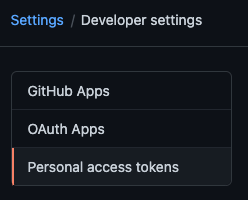
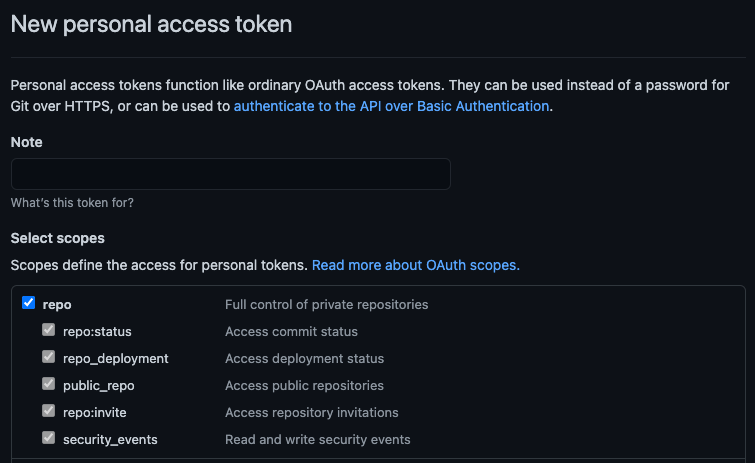
You would then choose to _Generate new token_ and give your token a description
and appropriate access to the `repo` scope. The `repo` scope will enable reading
file contents (more on
[scopes in the GitHub docs](https://docs.github.com/en/apps/oauth-apps/building-oauth-apps/scopes-for-oauth-apps#available-scopes)):
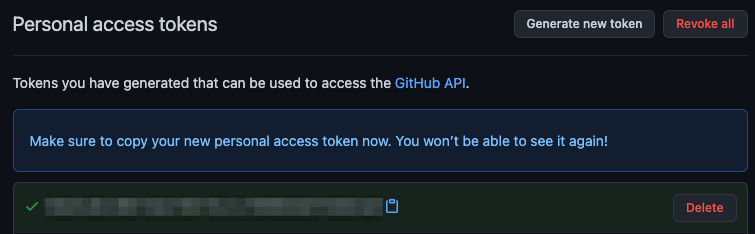
And once created GitHub will display the new token a single time, the value of
which you would want to use in the environment variable:
In order to access modules that are contained in a private repository on GitHub,
you would want to use the generated token in the `DENO_AUTH_TOKENS` environment
variable scoped to the `raw.githubusercontent.com` hostname. For example:
```sh
DENO_AUTH_TOKENS=a1b2c3d4e5f6@raw.githubusercontent.com
```
This should allow Deno to access any modules that the user who the token was
issued for has access to.
When the token is incorrect, or the user does not have access to the module,
GitHub will issue a `404 Not Found` status, instead of an unauthorized status.
So if you are getting errors that the modules you are trying to access are not
found on the command line, check the environment variable settings and the
personal access token settings.
In addition, `deno run -L debug` should print out a debug message about the
number of tokens that are parsed out of the environment variable. It will print
an error message if it feels any of the tokens are malformed. It won't print any
details about the tokens for security purposes.